Original post is here.
Error handling is not limited to LogicFlow in most cases. Even if you do not need to do anything when an error occurs, you need to know that an error occurred. I tried summarizing what correspondence can be taken with LogicFlow.
The error handling that can be implemented in LogicFlow is the following pattern.
- Setting the action with the execution condition set to "Error"
- Monitor with Action Failed specified by alert rule
1: Setting action to be executed on error
The actions used in LogicFlow can set execution conditions. It can be specified by combining four types of "Successful", "When Failed", "Skipped", "Time Out", and when performing error handling, "Including When Failed" will be included.
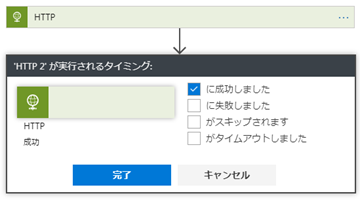
Since this execution condition is judged against the immediately preceding action, if an error occurs somewhere in the processing, it can not be used as it is as it is. In such a case, it is necessary to combine multiple actions into one action using "scope".

Since this execution condition is judged against the immediately preceding action, if an error occurs somewhere in the processing, it can not be used as it is as it is. In such a case, it is necessary to combine multiple actions into one action using "scope".
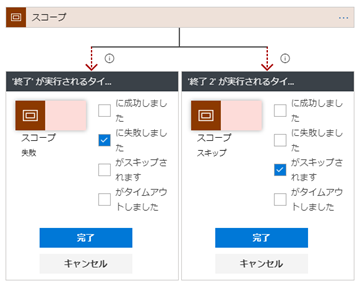
When there are cases where it is not executed at the same time, such as normal time, error occurrence, etc., I think that it is one thing to divide it as parallel processing.
In summary, this method is suitable for use when "some processing is required at the same time when an error occurs". Is it a case where it is somewhat necessary to handle some action on one action rather than simply outputting logs.
2: Specify Action Failed with Alert Rule
Another way, error handling is slightly different nuance. It is limited to LogicApps, but it has a function of issuing an alert when it matches the condition specified as Azure's function, and it is a method using it.

After selecting the alert rule, click Add metric alert.

We will set conditions to generate alerts.
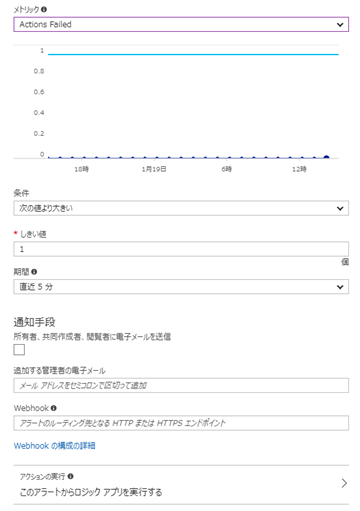
The condition is "metric" "condition" "threshold". If you specify Action Failed here, you can generate an alert in "When some action fails".
For details on what to do if an alert occurs, use "Webhook" at the bottom of the screen or "Execute action". It is possible to call a specific API when an alert occurs on Webhook, or call a specific LogicApps by executing an action.
I will attach the captured sample as to what kind of data actually flows.
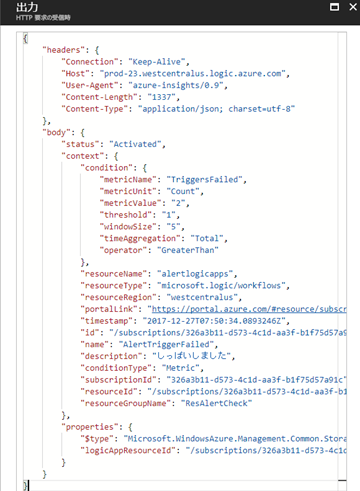
In this context, Japanese is described as "しっぱいしました" as a Description, but what is described in the "Description" column of the alert rule will be cooperated as it is. The value of Condition is also set in accordance with the condition of the alert rule. Therefore, it can not be used to grasp detailed error contents. It is possible until LogicApps detects that some error has occurred.
In summary, the error handling in the alert rule is "to detect whether an error occurred in one LogicApps", it is not a detailed error response, and it is larger than the previous execution condition such as recovering throughout I think that it is suitable for correspondence.
